
v2.3
Application tracking and job warnings
Track where each application stands, see warnings when a client may not hire from your country or asks for a special word in the proposal, and claim personal offers in one click.
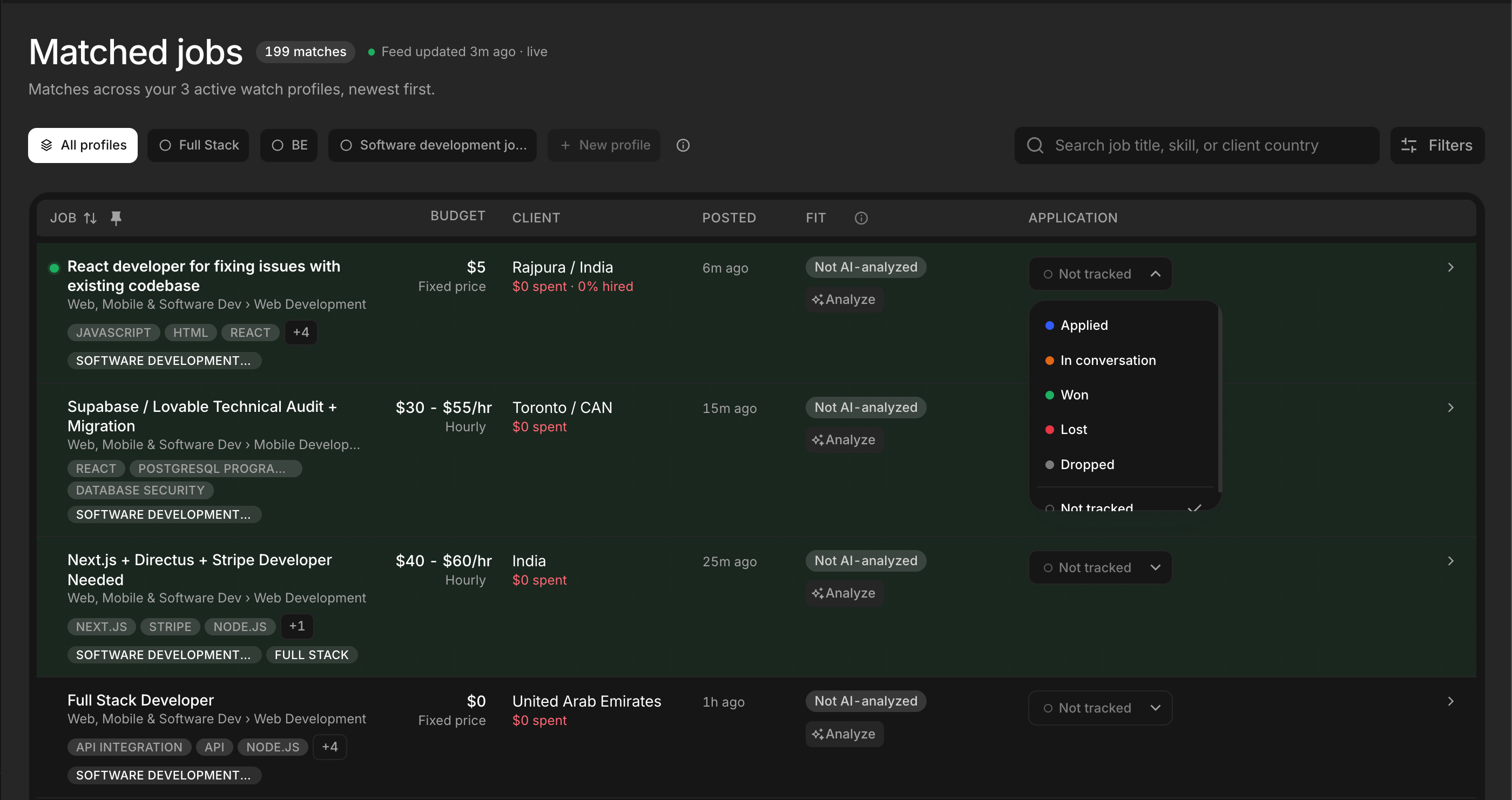
Track your applications
Mark a job as Applied, then record how it went: In conversation, Won, Lost or Dropped. Filter the feed by outcome and see your results charted on the dashboard.
Where you work from
Set your country (and optionally your city) in Settings. ProposalPing then warns you when a client only hires, or prefers to hire, from other locations. The AI score is not affected; it is a warning next to it.
Required word alerts
Some clients ask you to start your proposal with a specific word. ProposalPing spots these instructions and shows the word beside the job, so your proposal is not skipped.
Personal offers
When a discount is available to you, it appears as a small pill in the navbar with a live countdown. One click opens the plans with the code already applied.
Welcome email
New accounts get a welcome email with the first steps to get the most out of ProposalPing.
Clearer locked account screen
When your plan ends, the screen says exactly why your account is locked and shows any offer you can use to unlock it.
Correct "Posted" time for bumped jobs
When a client renews a job post, the Posted time now counts from the renewal.
Skill aliases match reliably
Keyword aliases now match the job's skill itself, so fewer relevant jobs are missed.